



Instructions
All submissions must present original and unpublished work that is not currently under consideration elsewhere. Submissions can have up to 4 pages formatted according to thestandard IEEE two columns template:
Accessing the templates:
Please submit your papers electronically in PDF format using the NCASAM-2023 at the address mail below regarding each speciality:
Physics:
Mathematics:
|
Mail :
|
Chemistry:
Computer Sciences:
Technology and Engineering:
Biological Sciences:
Note: after acceptance paper, the corresponding author should send a video recorder and expected to present the work online.
How to prepare a PowerPoint file in video format:
Please read carefully the instructions below for preparing a presentation video recorder. This guide shows the steps to prepare a video file using MS PowerPoint, however, authors are free to use any other tools.
Steps to prepare a power point file in video format:
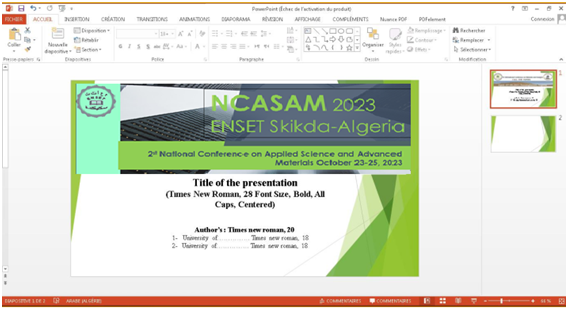
1 – Prepare the presentation in power point format normally, according to the form adopted for the conference and by numbering the slides.
2 – Once the entire presentation has been completed, it is recorded by giving your name and first name to the file preceded by Speciality-NCASAM-2023, example: Math-NCASAM-2023 Oral_First Name Last Name (For oral communications), and Math-NCASAM-2023 Poster _First Name Last Name (for poster communications)
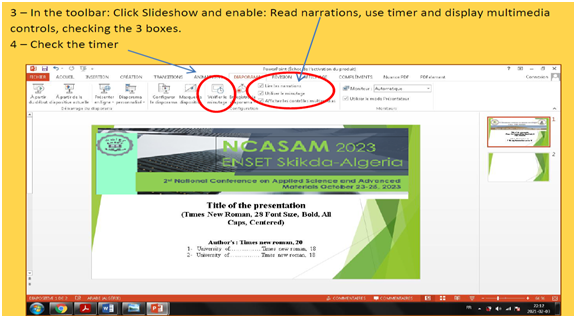
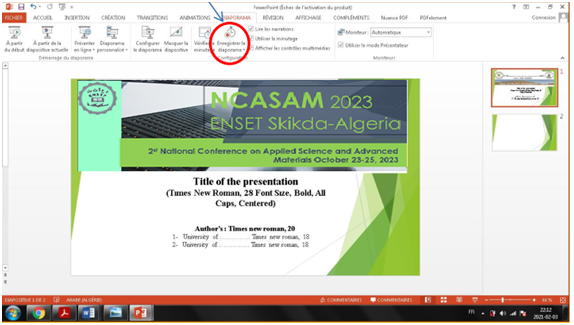
5 – Click Save slideshow and start recording from the beginning.
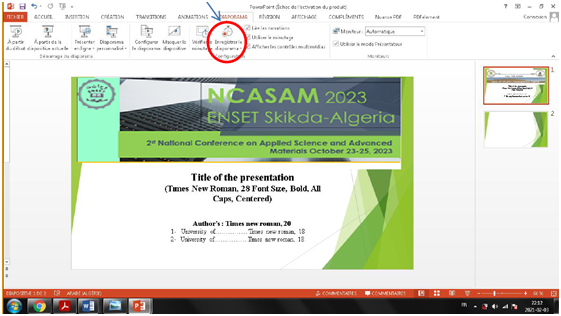
6 - The recording of your presentation starts with the timekeeping.
Don’t forget:
- Oral Communication: 10 minutes.
- Communication Poster: 5 minutes.
- Plenary: 20 minutes.
Time must be perfectly controlled and respected.
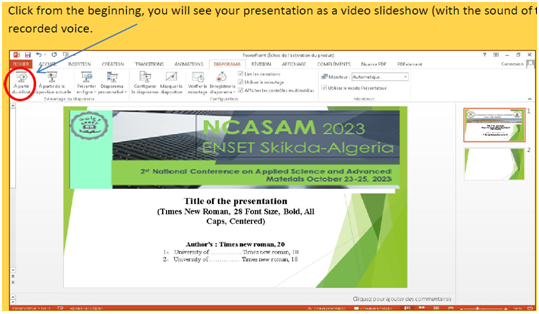
7 – Once the presentation is finished, click on the "Esc" key. You will have the following screen:
Click from the beginning, you will see your presentation as a video slideshow (with the sound of the recorded voice.
8 – Complete the required test number by saving your file each time under … until you get the video that satisfies you in terms of presentation and time.
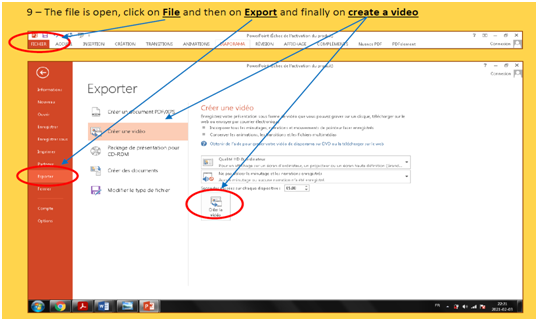
9 – The file is open, click on File and then on Export and finally on create a video
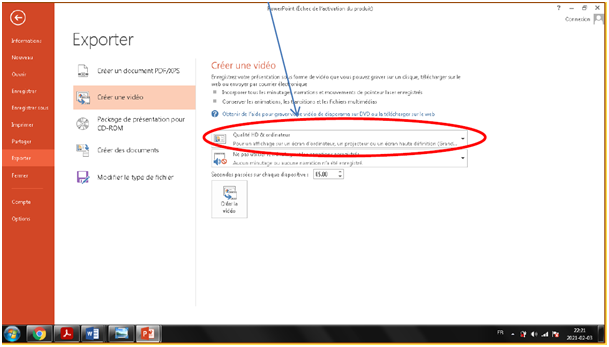
Note: If the file is large, it is strongly recommended to reduce the quality before saving the video format, choose the desired quality, and then create the video.
10 – Once your video is finalized, please save the name of your video file as: NCASAM-2023 – speciality- Oral_First Name Last Name or Speciality-NCASAM-2023 Poster _First Name Last Name
Send the videos to corresponding speciality Email indicate in site Conference.